
Authentication with Pocket ID
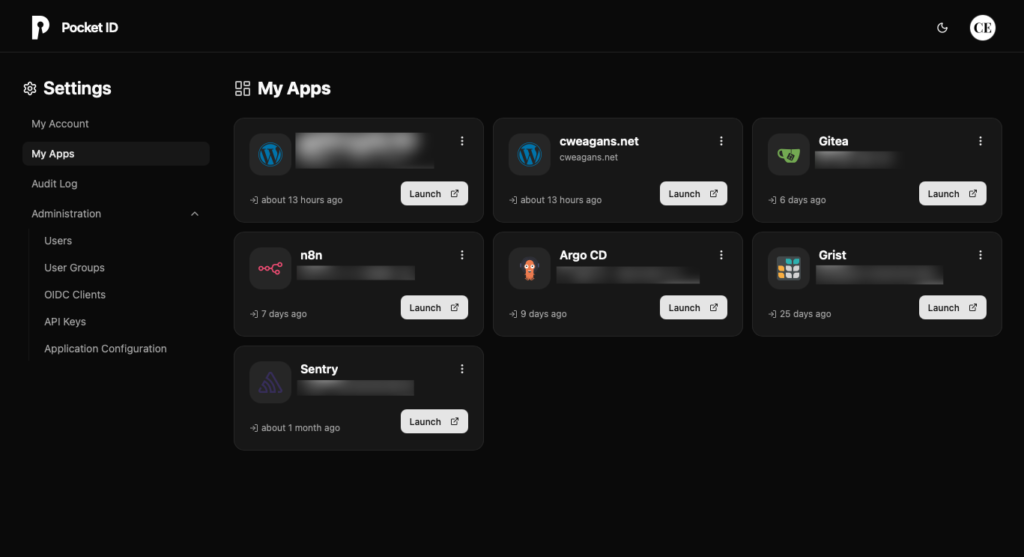
The problem with running a bunch of self-hosted services is that you end up with a bunch of separate login systems. Separate passwords (or worse, the same password everywhere), separate session management, separate “forgot password” flows for things that may not even have email configured. It gets messy fast. The right answer is a single identity provider that everything delegates to: one login, one session, and one place to revoke access.
Why not Keycloak?
Keycloak is the obvious choice. It’s mature, widely supported, and can do anything you’d ever want from an identity provider. It’s also a Java application that wants a gigabyte of RAM just to idle, ships with an admin UI that takes some time to learn, and has enough configuration surface area that you can spend hours setting it up and still not be sure you did it right.
For a homelab serving a handful of people, that’s too much. I wanted something I could set up in an afternoon and forget about. Keycloak is definitely not that.
Enter Pocket ID
Pocket ID is a simple OIDC provider with a specific, opinionated take: it only supports passkeys. That might sound limiting, but in practice it’s a feature. For the right audience, passkeys are a great alternative to passwords. They work great with hardware keys like YubiKeys, and every modern OS and password manager supports them. If you haven’t used passkeys yet, Pocket ID is a good forcing function.
The project describes itself as a simpler alternative to Keycloak for use cases that don’t need the full complexity. That’s exactly what this is.
Installation
The docs cover Docker as the primary path, but I deployed it the old-fashioned way: put the binary on a server and manage it with systemd. Pocket ID ships a single binary with no external dependencies. The process was roughly:
- Download the binary from the releases page
- Create a
.envfile with the required config (APP_URLandENCRYPTION_KEY) - Write a systemd unit file and enable it
- Point a reverse proxy at it.
That’s all there is to it. I did it with Ansible, but you could do it by hand in 20 minutes. The data directory (sqlite database, uploaded assets, generated keys) all lives next to the binary. Backups are a simple matter of taking a snapshot of the sqlite database and bundling that up with all the other related files on disk.
The one thing worth noting: Pocket ID requires HTTPS. It’s 2026 and you should be running TLS anyway, but passkeys don’t work over plain HTTP. It’s a hard technical requirement and not a suggestion.
Connecting clients
Every service that supports OIDC follows the same basic pattern. In the Pocket ID UI, you create a new OIDC client, give it a name, and paste in the redirect URI(s) for the application. Pocket ID gives you a client ID and a client secret. You paste those into the application’s config. Done.
The discovery endpoint is at the standard https://<your-pocket-id-url>/.well-known/openid-configuration. Most modern applications support auto-discovery, which means you paste in your issuer URL (https://<your-pocket-id-url>/) and the app figures out the rest.
Here’s what I’ve wired up so far:
- Gitea: supports OIDC natively. Setting the
server.DOMAINsetting in yourapp.iniis critical, but otherwise, you can configure the oauth2 provider in the admin UI. - Argo CD: Add an OIDC connector to
argocd-cm. Pretty straightforward. The trickier part is mapping groups to Argo CD roles if you want that, but for a personal setup where I’m the only admin, it’s not necessary. - Grist: Grist’s Enterprise Lite tier is free for self-hosters and includes OIDC support. Set
OIDC_IDP_ISSUERand the client credentials, restart, and it just works. - Sentry: Self-hosted Sentry doesn’t have native OIDC, but siemens/sentry-auth-oidc fills that gap. Install the plugin, configure the client credentials as Django settings, and Sentry gains an SSO login option.
- n8n: I covered this in detail in the n8n-oidc post. Pocket ID is the IdP I built that integration for.
- This site: WordPress supports OIDC via Jonathan Daggerhart‘s
openid-connect-genericplugin. It was a little hard to find, but it works very well.
The pattern is the same every time. At this point, OIDC support is nearly a hard requirement when I evaluate new self-hosted software. If it doesn’t have it, I either find a plugin, use oauth2-proxy in front of it, or pick a different tool.
One small detail worth mentioning: Pocket ID has an app dashboard that shows users all their connected applications, and each client can have its own icon (with separate light and dark mode variants if you want them). https://selfh.st/icons/ has a huge library of self-hosted app icons in multiple formats, and they slot right in. It’s a minor thing, but the dashboard looks more polished with real icons instead of placeholder initials. You don’t even have to download them first: Pocket ID will download icons from a URL that you provide in the UI.
What I think of it
Pocket ID is exactly what it says it is: a simple OIDC provider that supports passkey authentication. It does that job well, the UI is clean, and it has never given me a reason to think about it after initial setup (beyond adding new clients/users), which is exactly what I want from infrastructure like this.
There’s a version of me that would have reached for Keycloak because it’s the “real” solution – the one that I might encounter in an enterprise setting. I’ve made that mistake before with other tools. You spend a weekend configuring something designed for a team of fifty when you needed something for three people, and then you spend the next year maintaining that decision.
Pocket ID has some features I don’t use (LDAP sync, SCIM provisioning), but every time I try to articulate what should be cut, I can’t. The feature set feels right-sized for the problem space. That’s hard to get right, and it’s one of the things I pay attention to when evaluating software.
There’s a broader principle here that I keep coming back to in this homelab build: the goal isn’t to run the most sophisticated version of every component, but to run the appropriate one. Keycloak is appropriate for some problems. It’s not appropriate for my problems. Knowing the difference (and being willing to pick the smaller, simpler tool without feeling like you’re cutting corners) is a large part of what good infrastructure work actually is.